Athy .NET code-generator
OpenAPI spec in, .NET Web API solution out.
Archived showcase. Built 2020–2023 as part of Athy Labs, before ChatGPT and AI coding assistants were part of everyday development. It shows one way to generate .NET services from an OpenAPI spec using dotnet new templates and Roslyn. The tool is still on NuGet but no longer maintained.
What is this?
This is a code generator tool for .NET projects. It wraps the dotnet new custom template API. The tool maps an OpenAPI spec onto a templated user solution. You as the user are therefore in control of the generated output.
How to use this tool
Pre-requisites:
- at least netcore2.2 installed (but net7.0 probably better)
- an OpenAPI yaml file, put it in a directory, e.g.
C:\\dev\\generator\\my-spec\\pet-store.yamlhere’s an example one if you don’t have one handy - some templated user-code, also in a directory, e.g.
C:\\dev\\generator\\my-code, here’s a sample - Visual Studio 2022 (currently won’t work in older versions)
- [optional] customised user-code template.
Install the tool (don’t worry you can easily uninstall it).
- from a command line run:
dotnet tool install --global Athy.Generator.Console- now check the tool installed:
dotnet tool list -g- in case you want out at this point, you can uninstall:
dotnet tool uninstall -g athy.generator.console- it’s a normal CLI tool so you can run
athy-generator generate -hto see options. - open a new cmd line window at e.g.
C:\\dev\\generator(don’t open it at your %USERPROFILE% / user space directory, i.e. the default most likely, there’s a performance issue with it if you do this) - seriously, it will take like 10 minutes if you run it from some “C:\users\your-user” directory. 🤷♂️
- okay, now you can run the tool like so:
athy-generator generate --workingDirectory C:\\dev\\generator\\work --specFile C:\\dev\\generator\\my-spec\\pet-store.yaml --userCode C:\\dev\\generator\\my-code --solutionName web-api-v2 --outputDirectory C:\\dev\\generator\\output- depending on your system you may be prompted to select an SDK. ideally you can pick the latest installed one. just enter the associated “instance number”, e.g.: 1
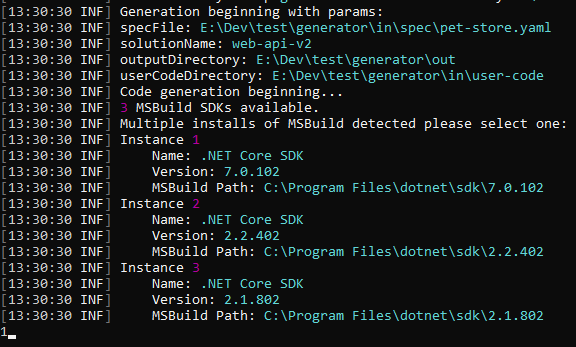
- ok now wait a bit, this is basically an “MVP” emphasis on the “M”, so it’s not that fast or fully-featured.
- once done you can access your generated code at the
--outputDirectorye.g.C:\\dev\\generator\\output
How does the tool work?
Okay assuming your code generated successfully, you may be wondering how it works and how to use it going forward.
The short version: it rewrites the dotnet new template from the spec (one controller method per endpoint), then runs it. The longer version is in this write-up on Athy Labs.
Why use this tool?
Well, why use any code-generator? If you’re new to the space, this type of tool can be useful if:
- you work in a team that news-up many projects, quite frequently, or,
- you work at an org that has lots of teams, ideally which are embarking on a lot of new projects, or at least have some upgrade projects in the pipeline.
Or some combo of the above, and:
- you care (a lot) about high consistency across your repos.
- you have lots of juniors / mids who you think need guidance / structure when creating new projects (debatable of course)
- you want to create lots of new services, as quickly as possible to validate an idea perhaps.
- you want to enable non-developer people (say an analyst) to help with a “design first” approach to API projects, elaboration:
- you want your teams to collaborate up-front on what a systems API contract (and hence it’s entry-level implementation) should look like, as opposed to the devs themselves coming up with contracts in isolation. (this tool obviously isn’t necessary for that, but it can help.)
Comparison with other code-generator tools
If you’re really interested (bored) I wrote some notes comparing other code-generator tools over here
Known issues
- it could run faster, and it runs super slow from C:\%USERPROFILE% for some reason
- doesn’t generate everything from the spec file
- there’s a bug with the output where it indents and leaves a newline above the API signature, after the swagger attributes.
Conclusion
Well I guess let me know if you’d actually use this tool (haha) and I could fix up some of the bugs / add some missing functionality, or you know, just go use ChatGPT.